Go Back   FlashFXP Forums > FlashFXP > Frequently Asked Questions (FAQ)

Frequently Asked Questions (FAQ) Answers to common questions, how to guides, and advanced configuration information.

Reply
 
Thread Tools Rate Thread
Old 03-20-2009, 08:54 PM   #1
FlashFXP Developer
FlashFXP Administrator
 
bigstar's Avatar
 
Join Date: Oct 2001
Posts: 7,093
Default How To: Backup / Restore FlashFXP Configuration

Backup
1. Start FlashFXP
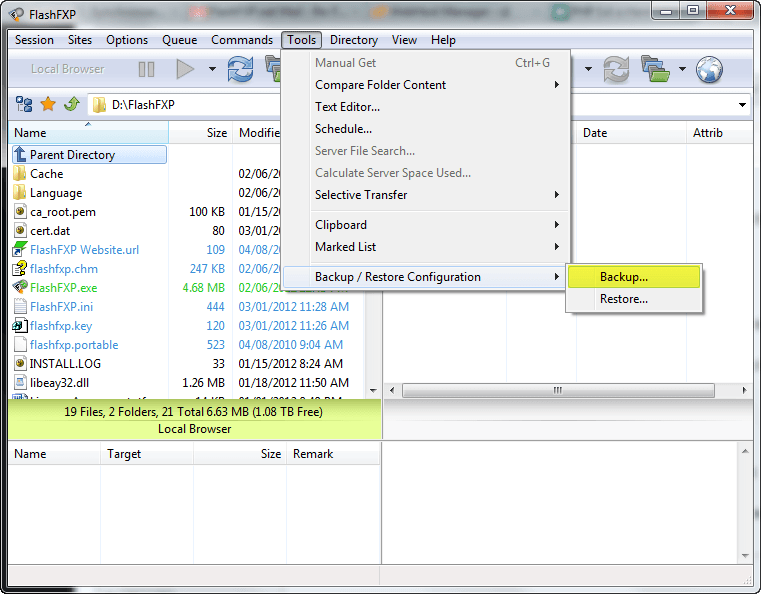
2. From the main menu, Tools, Backup / Restore Configuration and Select Backup Configuration.
3. Save your configuration to a file.
4. Copy the backup file to the new computer.

Restore
1. If you don't already have FlashFXP installed on the new computer, now is a good time to do that.
2. Start FlashFXP.
3. From the main menu, Tools, Backup / Restore Configuration and Select Restore configuration then select the backup file you previously created.
4. Restart FlashFXP.

Notes
Test FlashFXP and make sure your configuration was transferred properly.

When restoring your configuration your license information is not copied over, so make sure you have your license key so you can unlock FlashFXP.

Last edited by bigstar; 03-08-2012 at 05:45 PM.
bigstar is offline   Reply With Quote
Old 09-15-2011, 10:08 PM   #2
Member
FlashFXP Beta Tester
 
Oldbunny's Avatar
 
Join Date: May 2004
Location: Always here
Posts: 46
Default

Oldbunny is offline   Reply With Quote
Reply
Create a free account to browse our forums without ads


Thread Tools
Rate This Thread
Rate This Thread:

Posting Rules
You may not post new threads
You may not post replies
You may not post attachments
You may not edit your posts

BB code is On
Smilies are On
[IMG] code is On
HTML code is Off
Trackbacks are Off
Pingbacks are Off
Refbacks are Off


All times are GMT -5. The time now is 06:31 AM.